
Scouting Flow
Scouting Flow: 2026 Season
Section titled “Scouting Flow: 2026 Season”This guide walks you through the 2026 Season scouting process, from the initial autonomous period to the final submission.
Full Walkthrough Video
Section titled “Full Walkthrough Video”Watch this short video to see the entire flow in action on a mobile device:
 A complete scouting session: Match selection, Auto path tracing, Teleop
scoring, and Submission.
A complete scouting session: Match selection, Auto path tracing, Teleop
scoring, and Submission.
Phase 1: Autonomous (15s)
Section titled “Phase 1: Autonomous (15s)”The match begins with a 15-second autonomous period. Your primary job is to track the robot’s pre-programmed movement and scoring.
1. Trace the Auto Path
Section titled “1. Trace the Auto Path”This is a new 2026 feature. Use your finger (or mouse) to draw the path the robot took on the field map during the first 15 seconds.
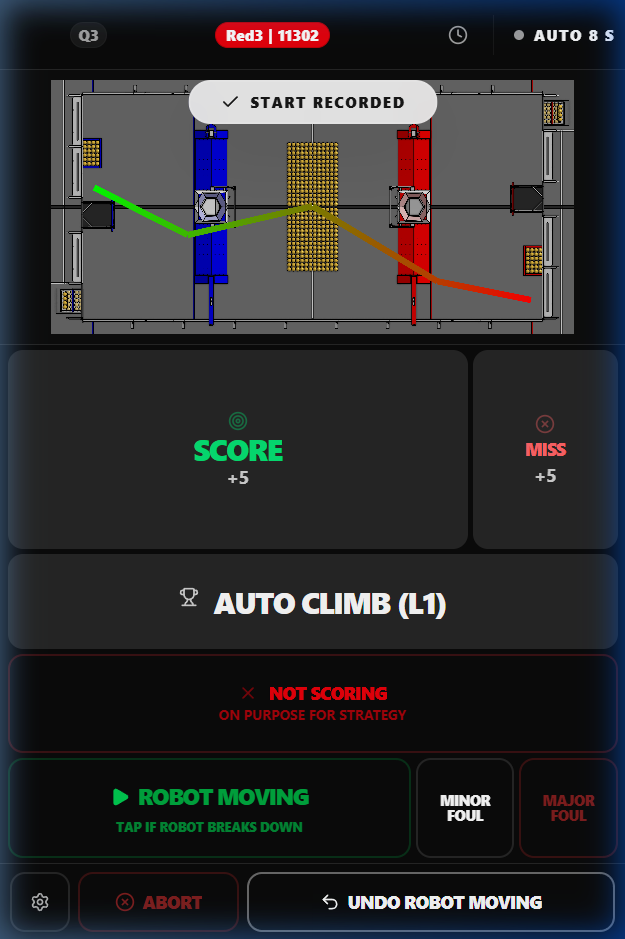 Trace the
robot’s movement. A smooth S-curve usually indicates a sophisticated auto
routine.
Trace the
robot’s movement. A smooth S-curve usually indicates a sophisticated auto
routine.
2. Auto Scoring & Climb
Section titled “2. Auto Scoring & Climb”- SCORE / MISS: Tap these as the robot attempts to fire fuel.
- AUTO CLIMB: If the robot climbs during the auto period, tap this immediately.
Phase 2: Teleop (135s)
Section titled “Phase 2: Teleop (135s)”Once the drivers take control, the interface switches to Teleop mode.
Core Controls
Section titled “Core Controls”- SCORE / MISS: The large buttons for recording scoring attempts.
- TRANSFER (FERRY/STEAL/ORGANIZE): Use these to track fuel being moved between zones.
- CLIMB: Tap this when the robot initiates its endgame climb.
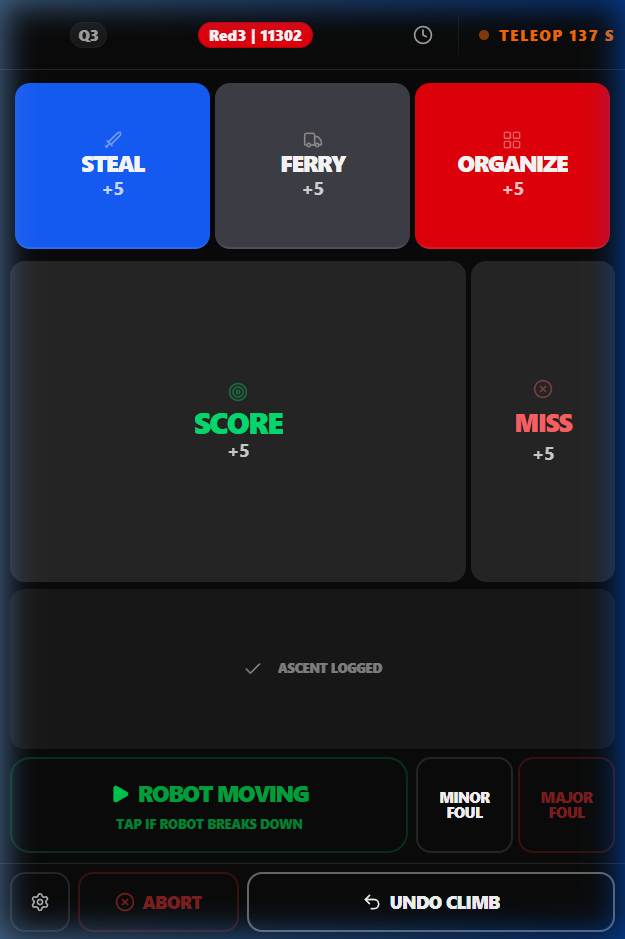 The Teleop
interface is optimized for speed. Use the Handedness toggle in settings if you
prefer the buttons on the left.
The Teleop
interface is optimized for speed. Use the Handedness toggle in settings if you
prefer the buttons on the left.
Advanced Controls (The Gear Icon)
Section titled “Advanced Controls (The Gear Icon)”Tap the Gear Icon at the bottom left to access:
- Bulk Quantity: Set this to +3 or +5 if the robot is scoring multiple fuel items at once.
- Flip Buttons: Swaps the Score/Miss position for left-handed scouts.
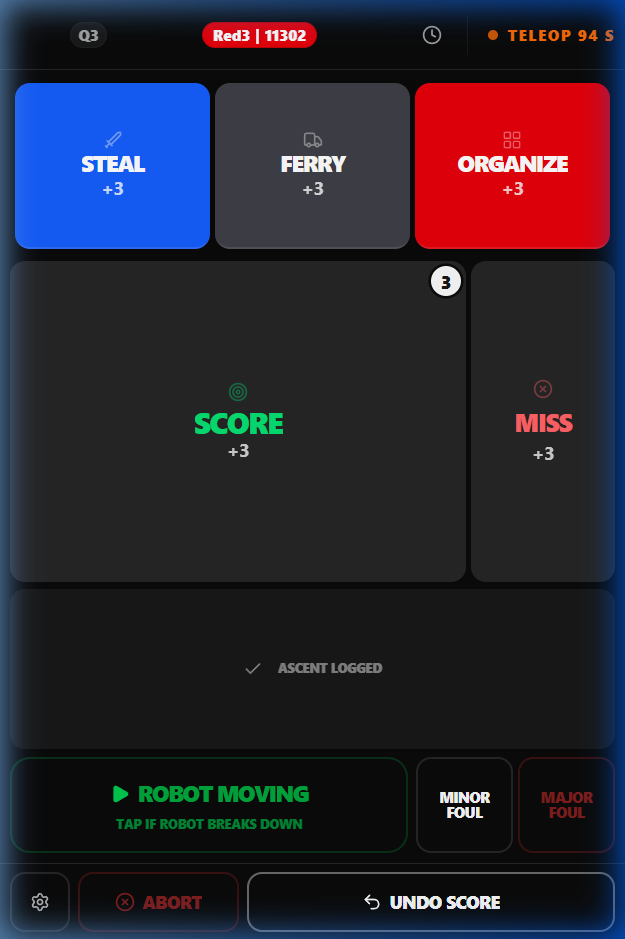 Setting Bulk Quantity
to +5. Notice the badge on the Score button updating to reflect the new count.
Setting Bulk Quantity
to +5. Notice the badge on the Score button updating to reflect the new count.
Phase 3: Post-Match & Submission
Section titled “Phase 3: Post-Match & Submission”After the match ends, you will reconcile and finalize the data.
- Reconciliation: The app will show a summary of what you recorded. Tap DONE to proceed.
- Climb Details: Record whether the climb was successful and which position (Left, Center, Right) they occupied.
- Comments: Add a brief note about the robot’s performance (e.g., “Fast cycles,” “Defensive powerhouse”).
- Finalize & Submit: Tap the large button to upload your data.
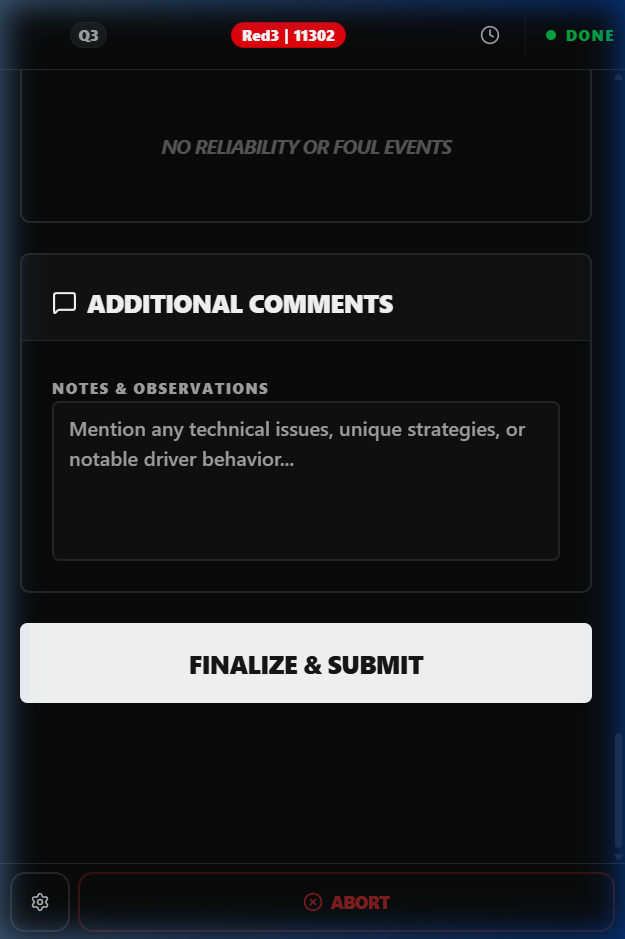 The final check
before submission. Ensure you add a comment for the drive team!
The final check
before submission. Ensure you add a comment for the drive team!
Pro-Tips for Success
Section titled “Pro-Tips for Success”:::caution[IMPORTANT] Don’t use “RE-SCOUT MATCH” for fresh data. If you realize you scouted the wrong match, exit to the dashboard and pick a new one. The “Re-scout” button will overwrite previous data. :::
- Undo is your friend: The Undo button at the bottom shows exactly what action is being reverted (e.g., “Undo SCORE +5”).
- Watch the Timer: Transitions between phases are automatic. If you miss something, use the Undo or add a note in the comments.
- Keep it Simple: Accuracy is better than detail. If the match is chaotic, focus on accurate scoring counts.